Automotive
You usually don’t have to do anything: your Tesla calibrates its cameras by itself after you drive 20–25 miles, and Tesla asks you to call only if it isn’t finished after 100 miles. The touchscreen Clear Calibration control restarts the process. After a windshield or camera replacement, a technician may also need to run pitch verification.
TL;DR:
- Self calibration usually finishes after 20–25 miles on a clear, marked highway, though road and weather conditions can change the distance.
- Use Controls > Service > Camera Calibration > Clear Calibration only after windshield or camera work; the reset erases stored positions but cannot correct physical misalignment.
- After windshield or camera replacement, ask a technician whether pitch verification is needed; a target checks camera angle, which driving alone cannot confirm.
- If Autopilot remains unavailable, camera errors appear, or progress stops, clean the camera area and contact Tesla after 100 miles without completion.
Table of Contents
- What camera calibration is and why it matters for Autopilot
- How to trigger calibration with the Clear Calibration control
- How long calibration takes and what speeds it up
- When windshield or camera work needs pitch verification
- What to check when calibration doesn’t finish
- What you’ll see when calibration is done
- How we handle Tesla windshield calibration
- Book ADAS calibration or windshield replacement with us
- FAQ
- Sources
What camera calibration is and why it matters for Autopilot
Calibration helps the car account for camera positions. Tesla says properly installed and calibrated cameras are important to Autopilot function.
There are two different processes, and owners often mix them up:
- Self-calibration: the car collects road data while you drive and aligns its internal camera positions, as described in the Model Y owner’s manual.
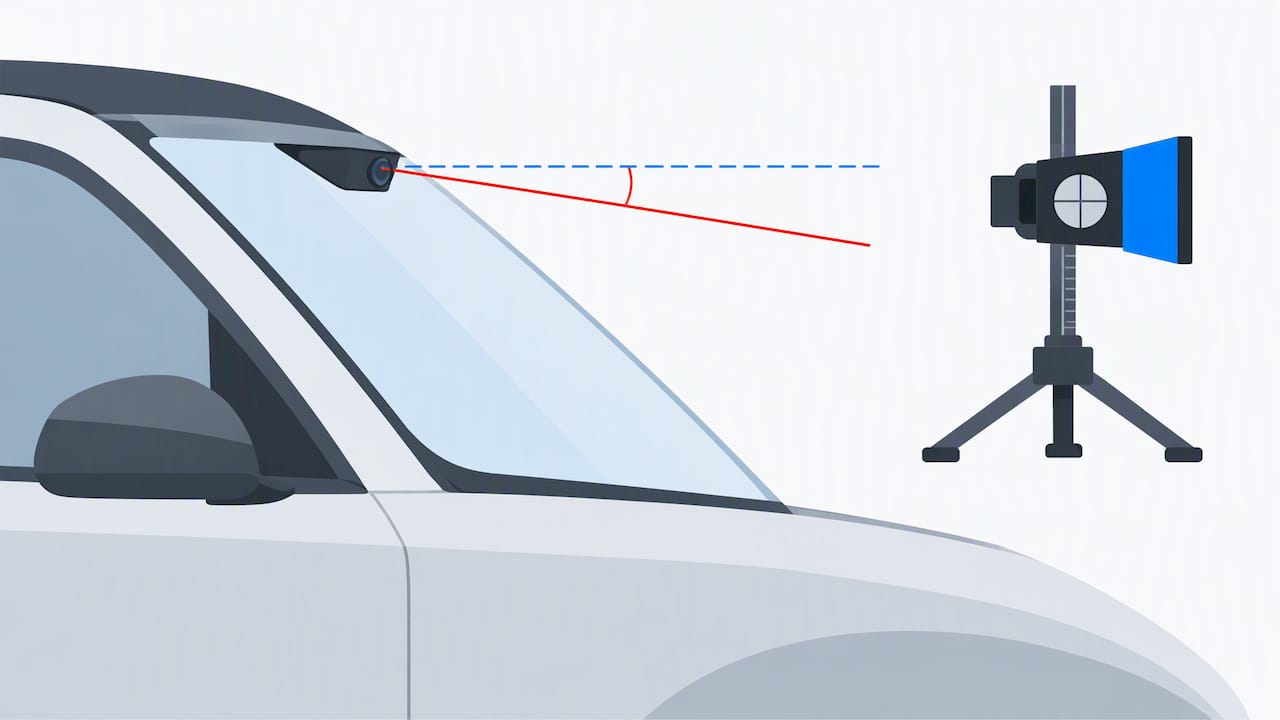
- Pitch verification: a physical check of the forward camera’s angle using a calibration target and precision tools, covered in Tesla’s service manual.
- Features that depend on it: Tesla says properly installed and calibrated cameras are important to Autopilot function.
Driving alone can’t fix a camera that sits at the wrong angle, which is why the physical check exists.
How to trigger calibration with the Clear Calibration control
You only need a reset when something physical has changed, such as a new windshield or a moved camera. Tesla’s owner documentation places the control at Controls > Service > Camera Calibration > Clear Calibration. Clearing is a software action that wipes the stored camera positions. It does not adjust anything physical, so don’t expect it to repair a misaligned camera.
- Park safely and open the touchscreen.
- Tap Controls, then Service, then Camera Calibration.
- Tap Clear Calibration and confirm.
- Drive on a multi-lane highway with clear lane markings.
- Watch the touchscreen for the calibration progress indicator.
- Park and let the car rest when the drive is done.
Pro Tip: Tesla describes clearing calibration as a software action and self-calibration as a process that happens while driving. Clear calibration only after a windshield or camera replacement or service.
How long calibration takes and what speeds it up
Tesla’s guidance is that calibration typically finishes after 20–25 miles (32–40 km) of driving, though road and weather conditions change the exact figure. Plan on a longer drive if your commute is mostly surface streets with faded paint, since the cameras learn fastest when they have sharp reference points.
These conditions help most, according to the owner’s manual:
- A straight, multi-lane controlled-access highway
- Clear, well-maintained lane markings
- Driving in the middle lane, where lines are visible on both sides
- Light traffic, so the cameras see the road rather than a wall of bumpers
Clear lane markings on a multi-lane highway can provide useful reference points during self-calibration.
Typical calibration takes 20–25 miles, and Tesla only asks you to make contact after 100 miles (160 km). The distance can vary with road and environmental conditions, so allow for that variation before contacting Tesla.
When windshield or camera work needs pitch verification
A drive cycle can’t confirm that a forward camera sits within factory angle limits. That takes a camera calibration target, and the Tesla service procedure for windshield replacement treats it as part of getting the camera working correctly afterward. Newer hardware adds Service Mode and Toolbox routines, as the camera assembly procedure shows.
A thorough job typically follows this sequence:
- Clear the stored calibration
- Run connection tests and confirm firmware
- Perform pitch verification against the target
- Enter the Toolbox calibration mode where the hardware requires it
- Hand the car back for a customer drive that completes calibration
| Step | Who does it | Why it matters |
|---|---|---|
| Clear calibration | Technician or owner | Removes old camera positions |
| Pitch verification | Technician with target | Confirms the camera angle |
| Toolbox calibration mode | Technician | Required on some hardware |
| Validation drive | Owner or technician | Finishes self-calibration |
Ask for written confirmation that the work was done. A single line on your invoice naming pitch verification is worth having if a question ever comes up later. Our own page on written windshield calibration proof for Tesla owners explains what that paperwork should show.
What to check when calibration doesn’t finish
Warning signs include Autopilot features that stay unavailable, no progress after 100 miles, or camera image errors. Tesla’s camera service documentation separates clearing calibration from driving to calibrate and from verifying pitch, so work through them in that order.
- Wipe the glass and camera area so dirt isn’t blocking the view, using trusted mobile detailing services found at Auto Image Detail – Detailing Services in Salina, KS
- Drive a clearly marked multi-lane highway rather than side streets
- Clear calibration only if a camera or windshield actually moved
- Let the car sleep between attempts
- Contact Tesla or an ADAS calibration shop if nothing changes after 100 miles
Pro Tip: Write down your starting odometer reading before each calibration drive, so you can tell Tesla or a shop exactly how far you’ve gone.
If your car is also showing lane warnings, our lane assist troubleshooting guide covers quick checks. A technician will typically run connection tests and a pitch check to find the cause.
What you’ll see when calibration is done
Tesla guidance describes self-calibration as an automatic process that takes place while driving. Check the touchscreen for any messages about camera calibration. It helps to keep a short note of the date, the steps you took and any shop paperwork. If a glass shop did the work, ask for written verification that includes the calibration steps performed.
- Check the touchscreen for calibration or camera messages
- Check whether features that were unavailable are available again
- Save any shop paperwork for your records
How we handle Tesla windshield calibration
We replace the glass at your home or workplace and complete the ADAS recalibration ourselves, so you don’t need a second appointment elsewhere. A typical visit covers glass replacement or repair and ADAS recalibration. We can bill your insurance directly where coverage applies. Ask us about the warranty terms. Please arrange a visit time with us, park somewhere with clear space around the car and keep the cabin clear of loose items.
— Auto Glass Kings
Book ADAS calibration or windshield replacement with us
Our ADAS calibration and windshield replacement services keep everything in one visit, so you skip dealership trips. Our cost guide explains pricing and insurance billing. Request a quote and we’ll schedule a time.
FAQ
How do I calibrate my Tesla camera?
Drive on a multi-lane highway with clear lane markings, and the car calibrates itself. Tesla’s guidance says this usually takes 20–25 miles. No manual step is needed unless a camera or windshield changed.
How do I reset the camera on a Tesla Model Y?
Open Controls > Service > Camera Calibration > Clear Calibration on the touchscreen. Use it only after a windshield or camera replacement or service. The car then recalibrates as you drive.
How can I check my Tesla camera visibility?
Clean the glass and camera area, then check the touchscreen for camera error messages. If features stay disabled or images show errors, calibration may be incomplete or a camera may need service.
Does a windshield replacement always need a shop calibration?
Not always, but self-calibration alone may not be enough. Tesla’s service manual describes pitch verification as a physical check that may be needed after windshield replacement.
Sources
Recommended
- Tesla Owners Demand Written Windshield Calibration Proof and Pitch Check
- $150–$800: ADAS Calibration for US Owners, Insurance & Mobile Billing
- Drivers: Get OEM Verified Windshield ADAS Calibration in One Visit
- Drivers: Lane Assist Not Working? 5 Minute Checks and Mobile ADAS Fix
🎧 Listen to This Article
Share
Recent Posts

October 27, 2026
Windshield Frit Band: What the Black Edge Does
What is the black band and dot pattern around your windshield? Learn what frit is, why it matters for adhesive bonding, and what...

October 26, 2026
Heads-Up Display Windshield: What Changes When You Replace It
A HUD windshield is built differently from standard glass. See how it works, what to check before replacement, and why calibration matters in...
October 25, 2026
Lifetime Windshield Warranty: What It Covers and What It Doesn’t
A lifetime windshield warranty rarely covers everything. Learn what it should include, what it excludes, and how ADAS calibration and insurance fit in....